Work Log Tracker: Your Simple System for Daily Wins
Let's be honest. The end of the workday can feel like a blur. You start with a plan, get pulled into a dozen different directions, and by five o'clock, it's hard to recall exactly what you accomplished. That vague sense of "busy but not productive" is a common frustration for entrepreneurs, creators, and professionals across every field. The solution isn't another complex app that requires a tutorial to use. It's a return to simplicity, a tangible record that brings clarity to your day. That's the core idea behind the Work Log Tracker, a digital download designed to be your daily anchor.
A Design Built for Real-World Use
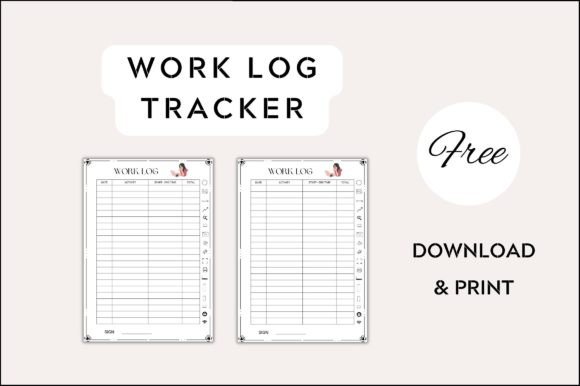
This isn't just a blank page with lines. The Work Log Tracker is a thoughtfully designed printable template that functions as a practical tool first. Its visual personality is clean, uncluttered, and professional. The layout uses a clear visual hierarchy to guide your eye naturally from the date and primary objectives at the top, through the detailed log of tasks and time, down to notes and priorities for tomorrow. This structure isn't arbitrary; it's based on how we naturally process a workday. The aesthetic leans into modern typography, favoring a clean sans serif font for maximum readability in a functional document. This choice ensures that your handwritten notes, whether in pen or pencil, remain the star of the show. The overall appeal is one of quiet competence—it’s a design asset that works for you without demanding attention.
The practicality extends to its format. Delivered as an A4 document standard, it fits perfectly into any printer setup without the hassle of resizing or trimming. You get a single, powerful colour variant in a free version, giving you an immediate starting point. The true value, however, lies in its adaptability. Because it's a digital download, you're not locked into a single style. The template serves as a robust foundation you can customize in minutes. Adjust the sections to emphasize project milestones, client hours, or creative brainstorming. This flexibility makes it a versatile piece of design assets for anyone's workflow.
Where This Tracker Truly Shines
Think of the Work Log Tracker as a versatile piece of your personal brand identity toolkit. Its strength lies in its neutrality, allowing it to serve a multitude of professions without feeling out of place.
- For Entrepreneurs and Small Business Owners: It becomes your accountability partner. Logging daily actions against goals provides a clear record for weekly reviews and helps identify time sinks. It’s a physical manifestation of your operational discipline, a key component of a strong brand identity.
- For Freelancers and Creatives: Designers, writers, and marketers can use it to track billable hours per project with effortless precision. It’s far more intuitive than switching between apps. The simple act of writing down a completed task, like "Finalized logo design concepts," provides a satisfying sense of closure that a digital checkbox often lacks.
- For Content Creators and Bloggers: Planning and tracking content production is crucial. This tracker can be adapted to log writing drafts, editing stages, social media scheduling, and engagement metrics. Seeing your pipeline visually can boost motivation and ensure consistency, which is vital for audience growth.
- For Hobbyists and Crafters: Even personal projects benefit from tracking. Use it to log hours spent on a complex craft project, note material costs, or document steps in a new recipe. It transforms a casual hobby into a documented journey of skill development.
In each case, the tracker moves beyond being a simple to-do list. It becomes a personal archive of effort and progress. This documentation is invaluable. For a business owner, it can inform future project quotes. For a creative, it can build a portfolio of process. For a hobbyist, it’s a map of how a skill was mastered. This is the essence of practical modern typography in action—using a well-designed tool to create order and meaning.
Integrating the Tracker into Your Creative Process
Adopting a new system should feel effortless. The Work Log Tracker is designed for this. Here’s how to make it work for you without overcomplicating things.
First, consider your primary need. Are you tracking time for clients, managing project tasks, or documenting personal progress? The template’s initial structure is a starting point. Spend five minutes at the beginning of the week customizing the headers or adding a checkbox column. Because it’s a digital download, you can create different versions for different clients or projects, saving them as separate files. This is where the "customize in a few clicks" promise becomes a reality.
Next, think about font pairing if you choose to edit the file digitally before printing. The included sans serif font pairs beautifully with a wide range of styles. For a project with a more elegant or personal feel, you could pair the tracker’s functional text with a subtle script font for your name or a project title. If your work is more technical or data-driven, pairing it with a clean serif font for body text can add a touch of traditional professionalism. The key is to maintain the tracker’s core readability. Avoid overly decorative display fonts or handwritten fonts for the main log lines, as they can hinder quick scanning and note-taking.
Finally, build the habit. Place your printed stack on your desk. Make the first task of your day, before even opening your laptop, to write down your top three priorities. Use it throughout the day as a living document, not just a morning ritual. At day’s end, take two minutes to review it. This simple act of reflection is where the real learning happens. Over time, this premium font tracker becomes more than paper; it becomes the script of your professional narrative, a tool that enhances your visual hierarchy