Master Your Inventory: The Asset Tracking Template for Google Sheets
Let’s be honest. As creative professionals, entrepreneurs, and business owners, our greatest fear isn't a bad review or a slow sales month—it’s the silent chaos of lost assets. That high-end monitor that "walked off," the collection of power tools for the job site, or even the expensive software licenses that are being paid for but never used. We often focus so much on creating our brand identity that we forget to manage the physical infrastructure holding it all together. This is where a practical, no-nonsense tool becomes your best friend. Enter the Asset Tracking Template - Google Sheet. It isn't just a spreadsheet; it’s a centralized command center for your physical inventory, designed to bring order to the madness of running a business.
The Anatomy of a Well-Organized Asset Register
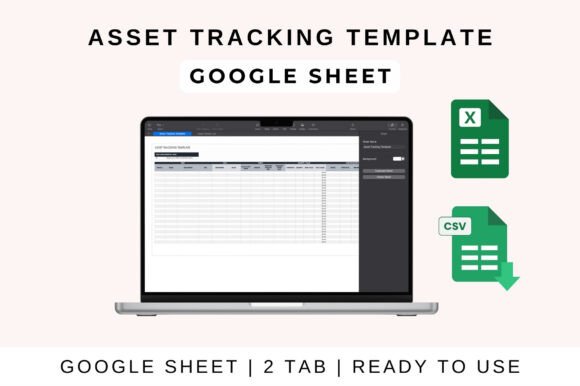
When you first open the Asset Tracking Template - Google Sheet, you’ll notice it doesn't try to be flashy. Like a good sans serif font in editorial design, it prioritizes function and clarity above all else. The visual "personality" of this template is structured, professional, and highly utilitarian. It is built to handle data density without becoming overwhelming, ensuring that whether you are tracking IT equipment, office furniture, or heavy machinery, the information remains accessible.
The core strength of this system lies in its comprehensive columns. You aren't just typing a name and calling it a day. The template prompts you to track specific, vital details:
- Asset Identification: Name, ID/Tag numbers.
- Categorization: Type and Location.
- Financial Data: Purchase Date, Cost, and Depreciation status.
- Operational Status: Current Condition and Warranty expiration.
This level of detail is crucial for calculating tax deductions and insurance needs. For a designer with a studio full of high-end equipment, or a crafter with industrial sewing machines, knowing the exact depreciation value of your gear is just as important as knowing where it is. The Asset Tracking Template acts as a living document that evolves with your business, much like a robust typeface family that offers various weights for different contexts.
Streamlining Workflow: From Data Entry to Decision Making
One of the biggest hurdles in inventory management is the friction of actually using the system. We’ve all downloaded complex software that takes three days to learn. This template avoids that trap. It is designed for the real world—specifically for the ecosystems we already live in: Google Sheets, Excel, and Apple Numbers.
If you are a small business owner or a freelancer, the process is seamless. You simply upload the file to Google Drive. There is no steep learning curve. The interface is intuitive, allowing you to enter data and immediately see the benefits. The "automated calculations" feature is a standout here. Much like a premium font that includes ligatures to improve flow, this template includes built-in formulas that automatically calculate totals and profit/loss metrics based on your asset value.
Consider a marketing agency or a content creator team. You can share this sheet with your team for real-time collaboration. If a photographer checks out a camera, they update the "Location" column. If a laptop needs repair, the status changes instantly. This transparency prevents the "I thought you had it" arguments that plague creative teams. It turns asset management into a collaborative effort rather than a chore for one unlucky person.
Strategic Asset Management for Brand Growth
You might wonder how a spreadsheet connects to your brand identity or design strategy. The connection is direct. Operational efficiency is the backbone of professionalism. When you know exactly what you have, where it is, and when it needs maintenance, you project competence.
Think about packaging design or web design projects. These often require specific hardware or software licenses. If you lose track of a license renewal because it was buried in an email, your project halts. The Asset Tracking Template allows you to monitor warranty status and schedule maintenance reminders. This proactive approach ensures you aren't scrambling to replace a dead hard drive in the middle of a major launch.
Furthermore, the ability to filter and search records is vital for scaling. As your inventory grows from 10 items to 100, you need a system that can handle the load. This template scales gracefully. It is an ideal solution for schools, organizations, and entrepreneurs alike. It provides a bird's-eye view of your investments, helping you make smarter purchasing decisions in the future. Should you buy the cheaper printer that breaks often, or invest in a higher-end model? Your maintenance history in the Google Sheet will tell the truth.
Practical Tips for Implementation
Getting started is easy, but maintaining the system requires a bit of discipline. Here is how to get the most out of this design asset:
- Standardize Your Naming: Just as you would with font files or design assets, create a naming convention. Don't just write "Laptop." Write "MacBook Pro 16-inch - Marketing Dept." This makes filtering infinitely easier.
- Use the Categories: The template is pre-set with categories. Use them. Whether it's IT equipment, office furniture, or tools, categorization allows you to see where your money is tied up.
- Regular Audits: A spreadsheet is only as good as the data in it. Schedule a quarterly "clean up" day. Walk through your studio or office and verify that the digital record matches the physical reality.
- Leverage the Share Function: If you have a team, delegate. If you are a hobbyist or crafter working with a partner, ensure both of you have access. Real-time updates save everyone time.
The Asset Tracking Template - Google Sheet is more than just a grid of cells. It is a fundamental tool for stability. In a creative world that often feels chaotic, having a reliable system for your physical assets provides the peace of mind you need to focus on what you do best: creating, designing, and growing your business. It’s the unsung hero of the organized creative professional.